In this article by Nathan Burba, author of Cocos2d for iPhone 1 Game Development Cookbook, we will cover the following points:
- Box2D setup and debug drawing
- Creating collision response routines
- Using different shapes
- Dragging and collision filtering
(Over 90 recipes for iOS 2D game development using cocos2d with this book and ebook.)
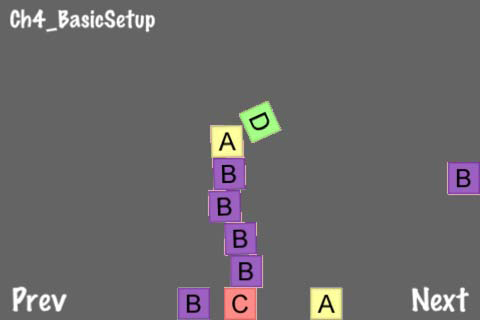
Box2D setup and debug drawing In our first physics recipe, we will explore the basics of creating a Box2D project and setting up a Box2D world. The example creates a scene that allows the user to create realistic 2D blocks.
Getting ready
Please refer to the project RecipeCollection02 for full working code of this recipe.
How to do it...
The first thing we need to do is create a Box2D project using the built-in Box2D project template:
- Go to File | New Project.
- Under User Templates click on Cocos2d.
- Now, right click on Cocos2d Box2d Application.
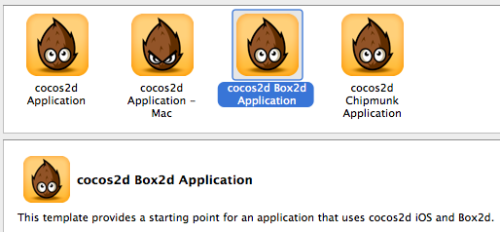
- Click Choose, name your project, and hit Save.
Now, execute the following code:
#import "Box2D.h"
#import "GLES-Render.h"
//32 pixels = 1 meter
#define PTM_RATIO 32
@implementation Ch4_BasicSetup
-(CCLayer*) runRecipe {
[super runRecipe];
/* Box2D Initialization */
//Set gravity
b2Vec2 gravity;
gravity.Set(0.0f, -10.0f);
//Initialize world
bool doSleep = YES;
world = new b2World(gravity, doSleep);
world->SetContinuousPhysics(YES);
//Initialize debug drawing
m_debugDraw = new GLESDebugDraw( PTM_RATIO );
world->SetDebugDraw(m_debugDraw);
uint32 flags = 0;
flags += b2DebugDraw::e_shapeBit;
m_debugDraw->SetFlags(flags);
//Create level boundaries
[self addLevelBoundaries];
//Add batch node for block creation
CCSpriteBatchNode *batch = [CCSpriteBatchNode
batchNodeWithFile:@"blocks.png" capacity:150];
[self addChild:batch z:0 tag:0];
//Add a new block
CGSize screenSize = [CCDirector sharedDirector].winSize;
[self addNewSpriteWithCoords:ccp(screenSize.width/2, screenSize.
height/2)];
//Schedule step method
[self schedule:@selector(step:)];
return self;
}
/* Adds a polygonal box around the screen */
-(void) addLevelBoundaries {
CGSize screenSize = [CCDirector sharedDirector].winSize;
//Create the body
b2BodyDef groundBodyDef;
groundBodyDef.position.Set(0, 0);
b2Body *body = world->CreateBody(&groundBodyDef);
//Create a polygon shape
b2PolygonShape groundBox;
//Add four fixtures each with a single edge
groundBox.SetAsEdge(b2Vec2(0,0), b2Vec2(screenSize.width/PTM_
RATIO,0));
body->CreateFixture(&groundBox,0);
groundBox.SetAsEdge(b2Vec2(0,screenSize.height/PTM_RATIO),
b2Vec2(screenSize.width/PTM_RATIO,screenSize.height/PTM_RATIO));
body->CreateFixture(&groundBox,0);
groundBox.SetAsEdge(b2Vec2(0,screenSize.height/PTM_RATIO),
b2Vec2(0,0));
body->CreateFixture(&groundBox,0);
groundBox.SetAsEdge(b2Vec2(screenSize.width/PTM_RATIO,screenSize.
height/PTM_RATIO), b2Vec2(screenSize.width/PTM_RATIO,0));
body->CreateFixture(&groundBox,0);
}
/* Adds a textured block */
-(void) addNewSpriteWithCoords:(CGPoint)p {
CCSpriteBatchNode *batch = (CCSpriteBatchNode*) [self
getChildByTag:0];
//Add randomly textured block
int idx = (CCRANDOM_0_1() > .5 ? 0:1);
int idy = (CCRANDOM_0_1() > .5 ? 0:1);
CCSprite *sprite = [CCSprite spriteWithBatchNode:batch
rect:CGRectMake(32 * idx,32 * idy,32,32)];
[batch addChild:sprite];
sprite.position = ccp( p.x, p.y);
//Define body definition and create body
b2BodyDef bodyDef;
bodyDef.type = b2_dynamicBody;
bodyDef.position.Set(p.x/PTM_RATIO, p.y/PTM_RATIO);
bodyDef.userData = sprite;
b2Body *body = world->CreateBody(&bodyDef);
//Define another box shape for our dynamic body.
b2PolygonShape dynamicBox;
dynamicBox.SetAsBox(.5f, .5f);//These are mid points for our 1m box
//Define the dynamic body fixture.
b2FixtureDef fixtureDef;
fixtureDef.shape = &dynamicBox;
fixtureDef.density = 1.0f;
fixtureDef.friction = 0.3f;
body->CreateFixture(&fixtureDef);
}
/* Draw debug data */
-(void) draw {
//Disable textures
glDisable(GL_TEXTURE_2D);
glDisableClientState(GL_COLOR_ARRAY);
glDisableClientState(GL_TEXTURE_COORD_ARRAY);
//Draw debug data
world->DrawDebugData();
//Re-enable textures
glEnable(GL_TEXTURE_2D);
glEnableClientState(GL_COLOR_ARRAY);
glEnableClientState(GL_TEXTURE_COORD_ARRAY);
}
/* Update graphical positions using physical positions */
-(void) step: (ccTime) dt {
//Set velocity and position iterations
int32 velocityIterations = 8;
int32 positionIterations = 3;
//Steo the Box2D world
world->Step(dt, velocityIterations, positionIterations);
//Update sprite position and rotation to fit physical bodies
for (b2Body* b = world->GetBodyList(); b; b = b->GetNext()) {
if (b->GetUserData() != NULL) {
CCSprite *obj = (CCSprite*)b->GetUserData();
obj.position = CGPointMake( b->GetPosition().x * PTM_RATIO,
b->GetPosition().y * PTM_RATIO);
obj.rotation = -1 * CC_RADIANS_TO_DEGREES(b->GetAngle());
}
}
}
/* Tap to add a block */
- (void)ccTouchesEnded:(NSSet *)touches withEvent:(UIEvent *)event {
for( UITouch *touch in touches ) {
CGPoint location = [touch locationInView: [touch view]];
location = [[CCDirector sharedDirector] convertToGL: location];
[self addNewSpriteWithCoords: location];
}
}
@end
How it works...
The Box2D sample project is a simple way to understand what a physics system looks like.
- Initialization:
Upon initialization of the b2World object, we set a few things including gravity, object sleeping, and continuous physics. Sleeping allows bodies that are at rest to take up less system resources. Gravity is typically set to a negative number in the Y direction but can be reset at any time using the following method on b2World:
void SetGravity(const b2Vec2& gravity);In addition to storing a pointer to the main b2World instance, we also usually store a pointer to an instance of GLESDebugDraw. - Debug drawing:
Debug drawing is handled by the GLESDebugDraw class as defined in GLESRender.h. Debug drawing encompasses drawing five different elements onscreen. These include shapes, joint connections, AABBs (axis-aligned bounding boxes), broad-phase pairs, and a center of mass bit. - Visual to physical drawing ratio:
We define the constant PTM_RATIO at 32, to allow consistent conversion between the physical world and the visual world. PTM stands for pixel to meter. Box2D measures bodies in meters and is built and optimized to work with bodies between the sizes of 0.1 to 10.0 meters. Setting this ratio to 32 is a common convention for optimal shapes to appear between 3.2 to 320 pixels on screen. Optimization aside, there is no upper or lower limit to Box2D body size. - Level boundaries:
In this and many future examples, we add a level boundary roughly encompassing the entire screen. This is handled with the creation of a b2Body object with four fixtures. Each fixture has a b2Polygon shape that defines a single edge. Creating an edge typically involves the following:
b2BodyDef bodyDef;
bodyDef.position.Set(0, 0);
b2Body *body = world->CreateBody(&bodyDef);
b2PolygonShape poly;
poly.SetAsEdge(b2Vec2(0,0), b2Vec2(480/PTM_RATIO,0));
body->CreateFixture(&poly,0);Because these edges have no corresponding visual components (they are invisible), we do not need to set the bodyDef.userData pointer. - Creating the blocks:
Blocks are created much in the same way that the level boundaries are created. Instead of calling SetAsEdge, we call SetAsBox to create a box-shaped polygon. We then set the density and friction attributes of the fixture. We also set bodyDef.userData to point to the CCSprite we created. This links the visual and the physical, and allows our step: method to reposition sprites as necessary. - Scheduling the world step:
Finally, we schedule our step method. In this method, we run one discrete b2World step using the following code:
int32 velocityIterations = 8;
int32 positionIterations = 3;
world->Step(dt, velocityIterations, positionIterations);The Box2D world Step method moves the physics engine forward one step. The Box2D constraint solver runs in two phases: the velocity phase and position phase. These determine how fast the bodies move and where they are in the game world. Setting these variables higher results in a more accurate simulation at the cost of speed. Setting velocityIterations to 8 and positionIterations to 3 is the suggested baseline in the Box2D manual. Using the dt variable syncs the logical timing of the application with the physical timing. If a game step takes an inordinate amount of time, the physics system will move forward quickly to compensate. This is referred to as a variable time step. An alternative to this would be a fixed time step set to 1/60th of a second. In addition to the physical step, we also reposition and re-orientate all CCSprites according to their respective b2Body positions and rotations:for (b2Body* b = world->GetBodyList(); b; b = b->GetNext()) {
if (b->GetUserData() != NULL) {
CCSprite *obj = (CCSprite*)b->GetUserData();
obj.position = CGPointMake( b->GetPosition().x * PTM_RATIO,
b->GetPosition().y * PTM_RATIO);
obj.rotation = -1 * CC_RADIANS_TO_DEGREES(b->GetAngle());
}
}Taken together, these pieces of code sync the physical world with the visual.
Creating collision response routines To make efficient and organized use of Box2D, we must create a few wrapper classes to encapsulate specific functionality. In this recipe, we will use these classes to add collision response routines to our simple falling block demo from the previous recipe.
Getting ready
Please refer to the project RecipeCollection02 for full working code of this recipe. Also, note that some code has been omitted for brevity.
How to do it...
Execute the following code:
/* GameObject.h */
@interface GameObject : CCNode {
@public
GameArea2D *gameArea; b2Body *body; b2BodyDef *bodyDef;
b2FixtureDef *fixtureDef; b2PolygonShape *polygonShape;
b2CircleShape *circleShape; CCSprite *sprite;
int typeTag; bool markedForDestruction;
}
/* GameSensor.h */
@interface GameSensor : GameObject {}
@property (readonly) int type;
@end
/* GameMisc.h */
@interface GameMisc : GameObject {
@public
float life;
}
@property (readonly) int type;
@property (readwrite, assign) float life;
@end
/* BasicContactListener.h */
class basicContactListener : public b2ContactListener
{
public:
void BeginContact(b2Contact* contact);
};
void basicContactListener::BeginContact(b2Contact* contact)
{
b2Body *bodyA = contact->GetFixtureA()->GetBody();
b2Body *bodyB = contact->GetFixtureB()->GetBody();
//Handle collision using your custom routine
if(bodyA and bodyB){
GameObject *objA = (GameObject*)bodyA->GetUserData();
GameObject *objB = (GameObject*)bodyB->GetUserData();
GameArea2D *gameArea = (GameArea2D*)objA.gameArea;
[gameArea handleCollisionWithObjA:objA withObjB:objB];
}
}
/* GameArea2D.h */
@implementation GameArea2D
-(CCLayer*) runRecipe {
/* CODE OMITTED */
//Add contact filter and contact listener
world->SetContactListener(new basicContactListener);
/* CODE OMITTED */
//Add button to hide/show debug drawing
CCMenuItemFont* swapDebugDrawMIF = [CCMenuItemFont
itemFromString:@"Debug Draw" target:self selector:@
selector(swapDebugDraw)];
CCMenu *swapDebugDrawMenu = [CCMenu menuWithItems:swapDebugDrawMIF,
nil];
swapDebugDrawMenu.position = ccp( 260 , 20 );
[self addChild:swapDebugDrawMenu z:5];
//Schedule our every tick method call
[self schedule:@selector(step:)];
return self;
}
/* This is called from 'basicContactListener'. It will need to be
overridden. */
-(void) handleCollisionWithObjA:(GameObject*)objA
withObjB:(GameObject*)objB {
/** ABSTRACT **/
}
/* Destroy the world upon exit */
- (void) dealloc {
delete world; world = NULL;
delete m_debugDraw;
[super dealloc];
}
/* Debug information is drawn over everything */
-(void) initDebugDraw {
DebugDrawNode * ddn = [DebugDrawNode createWithWorld:world];
[ddn setPosition:ccp(0,0)];
[gameNode addChild:ddn z:100000];
}
/* When we show debug draw we add a number of flags to show specific
information */
-(void) showDebugDraw {
debugDraw = YES;
uint32 flags = 0;
flags += b2DebugDraw::e_shapeBit;
flags += b2DebugDraw::e_jointBit;
flags += b2DebugDraw::e_aabbBit;
flags += b2DebugDraw::e_pairBit;
flags += b2DebugDraw::e_centerOfMassBit;
m_debugDraw->SetFlags(flags);
}
@end
@implementation Ch4_CollisionResponse
-(CCLayer*) runRecipe {
/* CODE OMITTED */
//Create circular GameSensor object
GameSensor *gameObjSensor = [[GameSensor alloc] init];
gameObjSensor.gameArea = self;
//Create the body definition
gameObjSensor.bodyDef->type = b2_staticBody;
gameObjSensor.bodyDef->position.Set(240/PTM_RATIO,160/PTM_RATIO);
gameObjSensor.bodyDef->userData = gameObjSensor;
//Create the body
gameObjSensor.body = world->CreateBody(gameObjSensor.bodyDef);
//Create the shape and fixture
gameObjSensor.circleShape = new b2CircleShape();
gameObjSensor.circleShape->m_radius = 1.0f;
//Create the fixture definition
gameObjSensor.fixtureDef->shape = gameObjSensor.circleShape;
gameObjSensor.fixtureDef->isSensor = YES;
//Create the fixture
gameObjSensor.body->CreateFixture(gameObjSensor.fixtureDef);
//Create level boundaries
[self addLevelBoundaries];
//Add block batch sprite
CCSpriteBatchNode *batch = [CCSpriteBatchNode
batchNodeWithFile:@"blocks.png" capacity:150];
[gameNode addChild:batch z:0 tag:0];
return self;
}
/* Our base collision handling routine */
-(void) handleCollisionWithObjA:(GameObject*)objA
withObjB:(GameObject*)objB {
//SENSOR to MISC collision
if(objA.type == GO_TYPE_SENSOR && objB.type == GO_TYPE_MISC){
[self handleCollisionWithSensor:(GameSensor*)objA
withMisc:(GameMisc*)objB];
}else if(objA.type == GO_TYPE_MISC && objB.type == GO_TYPE_SENSOR){
[self handleCollisionWithSensor:(GameSensor*)objB
withMisc:(GameMisc*)objA];
}
//MISC to MISC collision
else if(objA.type == GO_TYPE_MISC && objB.type == GO_TYPE_MISC){
[self handleCollisionWithMisc:(GameMisc*)objA withMisc:(GameMisc*)
objB];
}
}
/* Handling collision between specific types of objects */
-(void) handleCollisionWithSensor:(GameSensor*)sensor
withMisc:(GameMisc*)misc {
[message setString:@"Box collided with sensor"];
[self runAction:[CCSequence actions:[CCDelayTime
actionWithDuration:0.5f],
[CCCallFunc actionWithTarget:self selector:@
selector(resetMessage)], nil]];
}
-(void) handleCollisionWithMisc:(GameMisc*)a withMisc:(GameMisc*)b {
[message setString:@"Box collided with another box"];
[self runAction:[CCSequence actions:[CCDelayTime
actionWithDuration:0.5f],
[CCCallFunc actionWithTarget:self selector:@
selector(resetMessage)], nil]];
}
/* Adding a new block */
-(void) addNewObjectWithCoords:(CGPoint)p {
/* CODE OMITTED */
}
- (void)ccTouchesEnded:(NSSet *)touches withEvent:(UIEvent *)event {
for( UITouch *touch in touches ) {
CGPoint location = [touch locationInView: [touch view]];
location = [[CCDirector sharedDirector] convertToGL: location];
[self addNewObjectWithCoords: location];
}
}
@end
How it works...
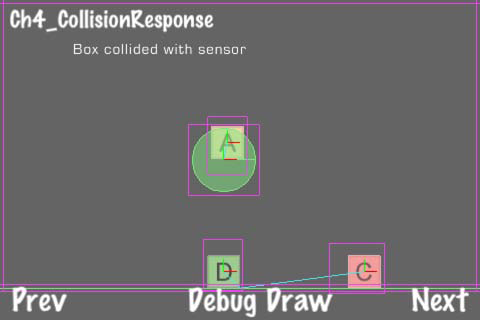
Here, we see the same block creation recipe from before except now a message is printed on the screen when either blocks collide with each other or they collide with a sensor.
- GameObject:
The GameObject class encapsulates Box2D data structures to help ease the process of Box2D object creation. It also includes a pointer back to its parent GameArea object as well as some other information we will use later. GameObject is intended to be an abstract base class that should be extended for specific uses. - Sensors:
A fixture attached to a b2Body can be set to 'sensor mode'. This allows collision response routines to run without the body actually existing in the world physically. No physical collision response will occur. We've encapsulated this functionality in the GameSensor class. An object of this class can be differentiated from other objects by checking its type property. - GameMisc:
The GameMisc class exists as an example of a typical extension of GameObject. The only added functionality in GameMisc is the life variable that we will use in later recipes. - GameArea2D:
The GameArea2D class is where the action happens. Here, we encapsulate most of the functionality outlined in the previous recipe. In addition to that, we have an instance of DebugDrawNode and an instance of CCNode entitled gameNode. These allow us to draw our debug information and our game information separately from the main scene. This feature will come in handy as recipes become more complex. - Contact listeners:
The class b2ContactListener is commonly overridden to allow for custom collision response handling. We extend b2ContentListener to create the basicContentListener class. There are four methods that can be extended to detect collision at a number of different intervals:
void BeginContact(b2Contact* contact);
void EndContact(b2Contact* contact);
void PreSolve(b2Contact* contact, const b2Manifold* oldManifold);
void PostSolve(b2Contact* contact, const b2ContactImpulse*
impulse);The methods BeginContact and EndContact are fairly self-explanatory. The former is called when two fixtures begin to touch, the latter when they cease to touch. The PreSolve and PostSolve methods are called before and after the contact solver routine runs. For this recipe, we are only concerned with BeginContact. In this method, we retrieve two GameObject instances from body->GetUserData() and we pass them to the following method in the corresponding GameArea instance:-(void) handleCollisionWithObjA:(GameObject*)objA
withObjB:(GameObject*)objB;That method checks object types and finally displays different messages onscreen.
There's more...
In this example, blocks are colliding with a static sensor. The sensor does not move because its body type attribute is set to b2_staticBody. Static bodies never move and they do not collide with each other. Each block has its type attribute set to b2_dynamicBody. Dynamic bodies move freely and collide with all other bodies.
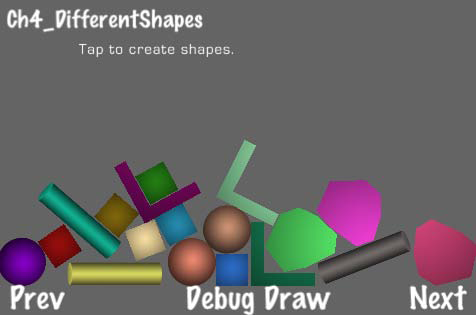
Using different shapes The primary attribute a Box2D body has is its shape. Box2D uses two classes, b2PolygonShape and b2CircleShape, to represent any possible shape. In this recipe, we will create a number of different shapes.
Getting ready
Please refer to the project RecipeCollection02 for full working code of this recipe.
How to do it...
Execute the following code:
@implementation Ch4_DifferentShapes
/* Here add an object randomly chosen from a rectangle, square,
circle, convex polygon and multi-fixture concave polygon. */
-(void) addNewObjectWithCoords:(CGPoint)p
{
//Initialize the object
GameMisc *obj = [[GameMisc alloc] init];
obj.gameArea = self;
obj.bodyDef->type = b2_dynamicBody;
obj.bodyDef->position.Set(p.x/PTM_RATIO, p.y/PTM_RATIO);
obj.bodyDef->userData = obj;
obj.body = world->CreateBody(obj.bodyDef);
obj.fixtureDef->density = 1.0f;
obj.fixtureDef->friction = 0.3f;
obj.fixtureDef->restitution = 0.2f;
//Pick a random shape, size and texture
int num = arc4random()%5;
if(num == 0){
/* Create square object */
/* CODE OMITTED */
//Create shape, add to fixture def and finally create the fixture
obj.polygonShape = new b2PolygonShape();
obj.polygonShape->SetAsBox(shapeSize/PTM_RATIO, shapeSize/PTM_
RATIO);
obj.fixtureDef->shape = obj.polygonShape;
obj.body->CreateFixture(obj.fixtureDef);
}else if(num == 1){
/* Create circle object */
/* CODE OMITTED */
//Create shape, add to fixture def and finally create the fixture
obj.circleShape = new b2CircleShape();
obj.circleShape->m_radius = shapeSize/PTM_RATIO;
obj.fixtureDef->shape = obj.circleShape;
obj.fixtureDef->restitution = 0.9f;
obj.body->CreateFixture(obj.fixtureDef);
}else if(num == 2){
/* Create rectangle object */
/* CODE OMITTED */
//Create shape, add to fixture def and finally create the fixture
obj.polygonShape = new b2PolygonShape();
obj.polygonShape->SetAsBox(shapeSize.x/PTM_RATIO, shapeSize.y/
PTM_RATIO);
obj.fixtureDef->shape = obj.polygonShape;
obj.body->CreateFixture(obj.fixtureDef);
}else if(num == 3){
/* Create convex polygon object */
/* CODE OMITTED */
//Create shape, add to fixture def and finally create the fixture
obj.polygonShape = new b2PolygonShape();
obj.polygonShape->Set(vertices, numVerts);
obj.fixtureDef->shape = obj.polygonShape;
obj.body->CreateFixture(obj.fixtureDef);
}else if(num == 4){
/* Create concave multi-fixture polygon */
/* CODE OMITTED */
//Create two opposite rectangles
for(int i=0; i<2; i++){
CGPoint shapeSize;
if(i == 0){ shapeSize = ccp(2.0f, 0.4f);
}else{ shapeSize = ccp(0.4f, 2.0f); }
CGPoint vertexArr[] = { ccp(0,0), ccp(shapeSize.x,0),
ccp(shapeSize.x,shapeSize.y), ccp(0,shapeSize.y) };
int32 numVerts = 4;
b2Vec2 vertices[4];
NSMutableArray *vertexArray = [[[NSMutableArray alloc] init]
autorelease];
//Set vertices
for(int i=0; iSet(vertices, numVerts);
obj.fixtureDef->shape = obj.polygonShape;
obj.body->CreateFixture(obj.fixtureDef);
}
}
//Set a random color
[obj.sprite setColor:ccc3(arc4random()%5, arc4random()%5,
arc4random()%5)];
}
- (void)ccTouchesEnded:(NSSet *)touches withEvent:(UIEvent *)event {
for( UITouch *touch in touches ) {
CGPoint location = [touch locationInView: [touch view]];
location = [[CCDirector sharedDirector] convertToGL: location];
[self addNewObjectWithCoords: location];
}
}
@end
How it works...
In this recipe, we randomly create objects with five different shapes: square, circle, rectangle, an oddly shaped convex polygon, and a simple concave polygon.
- Rectangles:
Rectangles are created using the b2PolygonShape method SetAsBox just like in the first two recipes. In this example, we have a simple textured square as well as a rectangular column image. - Circles:
Circles are a special case in Box2D and they've been given a special class in b2CircleShape. After initialization, we simply set the m_radius variable of the circle shape. In this example, we also give the circle shaped objects a high restitution value to make them bounce. We will cover this in more depth in another recipe. - Convex polygons:
Individual polygons must be convex. This means that every angle inside the polygon is less than 180 degrees. For this example, we've created an oddly shaped convex polygon with 8 vertices. We are using TexturedPolygon to accurately draw this polygon. - Concave polygons:
Concave polygons can be represented by creating multiple convex polygons and linking them to one body using multiple fixtures. In this example, we link two simple convex polygons together by creating two fixtures on the same body. We reverse our width and height values to create a simple L-shaped object. With this technique, you can create arbitrarily complex shapes. - Extensibility of GameObject:
The GameObject class is primarily designed for single fixture bodies. It contains one CCSprite object, one b2FixtureDef, and so on. However, as you can see in the concave polygon example, you can create multiple CCSprite objects and link them to the main GameObject sprite. You can also reuse the Box2D object pointers within the GameObject instance to easily create multiple fixtures and shapes.
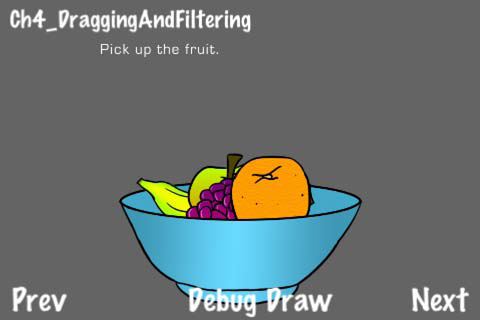
Dragging and collision filtering In a previous recipe, we handled user input to allow the user to drag an object. In this example, we see a bowl filled with pieces of fruit that can be dragged across the screen. A piece of fruit does not collide with another piece of fruit.
Getting ready
Please refer to the project RecipeCollection02 for full working code of this recipe.
How to do it...
Execute the following code:
enum { //Collision bits for filtering
CB_GROUND = 1<<0,
CB_FRUIT = 1<<2,
CB_BOWL = 1<<4
};
@implementation Ch4_DraggingAndFiltering
-(CCLayer*) runRecipe {
[super runRecipe];
[message setString:@"Pick up the fruit."];
//Create level boundaries
[self addLevelBoundaries];
//Add fruit bowl
[self addFruitBasket];
//Initialization of any variables
fruitGrabbed = NO;
return self;
}
/* Add basket and fruit objects */
-(void) addFruitBasket {
/* Add the basket */
/* CODE OMITTED */
//Add physical parts
b2BodyDef bowlBodyDef;
bowlBodyDef.position.Set(0, 0);
bowlBodyDef.type = b2_staticBody;
b2Body *body = world->CreateBody(&bowlBodyDef);
b2PolygonShape bowlShape;
b2FixtureDef bowlFixtureDef;
bowlFixtureDef.restitution = 0.5f;
bowlFixtureDef.filter.categoryBits = CB_BOWL;
bowlFixtureDef.filter.maskBits = CB_FRUIT;
//Rim left
bowlShape.SetAsEdge(b2Vec2(120.0f/PTM_RATIO,120.0f/PTM_RATIO),
b2Vec2(180.0f/PTM_RATIO,0.0f/PTM_RATIO));
bowlFixtureDef.shape = &bowlShape;
body->CreateFixture(&bowlFixtureDef);
/* CODE OMITTED */
/* Add fruit */
fruitObjects = [[[NSMutableArray alloc] init] autorelease];
[self addFruit:@"fruit_banana.png" position:ccp(210,200)
shapeType:@"rect"];
[self addFruit:@"fruit_apple.png" position:ccp(230,200)
shapeType:@"circle"];
[self addFruit:@"fruit_grapes.png" position:ccp(250,200)
shapeType:@"rect"];
[self addFruit:@"fruit_orange.png" position:ccp(270,200)
shapeType:@"circle"];
}
/* Add a fruit object with circle physical properties */
-(void) addFruit:(NSString*)spriteFrame position:(CGPoint)p
shapeType:(NSString*)s {
//Create GameMisc object
GameMisc *fruit = [[GameMisc alloc] init];
fruit.gameArea = self;
//Define body def and create body
fruit.bodyDef->type = b2_dynamicBody;
fruit.bodyDef->position.Set(p.x/PTM_RATIO, p.y/PTM_RATIO);
fruit.bodyDef->userData = fruit;
fruit.body = world->CreateBody(fruit.bodyDef);
//Create fixture def
fruit.fixtureDef->density = 1.0f;
fruit.fixtureDef->friction = 0.3f;
fruit.fixtureDef->restitution = 0.4f;
fruit.fixtureDef->filter.categoryBits = CB_FRUIT;
fruit.fixtureDef->filter.maskBits = CB_GROUND | CB_BOWL; //
Fruit does not collide with other fruit
//Create sprite
fruit.sprite = [CCSprite spriteWithSpriteFrameName:spriteFrame];
fruit.sprite.position = ccp(p.x,p.y);
if([s isEqualToString:@"circle"]){
/* Set fixture shape and sprite scale */
float textureSize = 160;
float shapeSize = 40;
fruit.sprite.scale = shapeSize / textureSize * 2;
[gameNode addChild:fruit.sprite z:2];
fruit.circleShape = new b2CircleShape();
fruit.circleShape->m_radius = shapeSize/PTM_RATIO;
fruit.fixtureDef->shape = fruit.circleShape;
}else if([s isEqualToString:@"rect"]){
/* Set fixture shape and sprite scale */
CGPoint textureSize = ccp(300,100);
CGPoint shapeSize = ccp(60,20);
fruit.sprite.scaleX = shapeSize.x / textureSize.x * 2;
fruit.sprite.scaleY = shapeSize.y / textureSize.y * 2;
[gameNode addChild:fruit.sprite z:2];
fruit.polygonShape = new b2PolygonShape();
fruit.polygonShape->SetAsBox(shapeSize.x/PTM_RATIO,
shapeSize.y/PTM_RATIO);
fruit.fixtureDef->shape = fruit.polygonShape;
}
//Finally create the fixture
fruit.body->CreateFixture(fruit.fixtureDef);
//Add object to container
[fruitObjects addObject:fruit];
grabbedFruit = fruit;
}
-(void) ccTouchesBegan:(NSSet *)touches withEvent:(UIEvent *)event {
UITouch *touch = [touches anyObject];
CGPoint point = [touch locationInView: [touch view]];
point = [[CCDirector sharedDirector] convertToGL: point];
/* Grab the nearest fruit */
//We first grab a fruit.
//Then, if another fruit is closer we grab that until we finally
have the closest one.
float grabbedDistance = distanceBetweenPoints(point,
ccp(grabbedFruit.body->GetPosition().x*PTM_RATIO, grabbedFruit.body-
>GetPosition().y*PTM_RATIO));
for(int i=0; iGetPosition().x*PTM_RATIO, fruit.body->GetPosition().y*PTM_RATIO),
point);
if(thisDistance < grabbedDistance){
grabbedFruit = fruit;
grabbedDistance = thisDistance;
}
}
//Set the fruit to 'grabbed'
fruitGrabbed = YES;
//Immediately move the fruit
[self ccTouchesMoved:touches withEvent:event];
}
-(void) ccTouchesMoved:(NSSet *)touches withEvent:(UIEvent *)event {
UITouch *touch = [touches anyObject];
CGPoint point = [touch locationInView: [touch view]];
point = [[CCDirector sharedDirector] convertToGL: point];
/* Reposition the grabbed fruit */
grabbedFruit.body->SetTransform(b2Vec2(point.x/PTM_RATIO, point.y/
PTM_RATIO), grabbedFruit.body->GetAngle());
b2Vec2 moveDistance = b2Vec2( (point.x/PTM_RATIO - grabbedFruit.
sprite.position.x/PTM_RATIO), (point.y/PTM_RATIO - grabbedFruit.
sprite.position.y/PTM_RATIO) );
lastFruitVelocity = b2Vec2(moveDistance.x*20, moveDistance.y*20);
}
-(void) ccTouchesEnded:(NSSet *)touches withEvent:(UIEvent *)event {
/* Release the fruit */
fruitGrabbed = NO;
grabbedFruit.body->SetLinearVelocity(lastFruitVelocity);
}
-(void) step: (ccTime) dt {
[super step:dt];
/* Suspend the fruit in mid-air while it is grabbed */
if(fruitGrabbed){
grabbedFruit.body->SetLinearVelocity(b2Vec2_zero);
}
}
@end
How it works...
In this example, we create a realistic 'grabbing' effect. We achieve this by repositioning the nearest Box2D body with the SetTransform method:
grabbedFruit.body->SetTransform(b2Vec2(point.x/PTM_RATIO, point.y/PTM_
RATIO), grabbedFruit.body->GetAngle());We then store the previous distance the object was moved, to determine a final velocity and then to allow the object to be 'thrown' when the user lets go. We apply this velocity using the SetLinearVelocity method:
grabbedFruit.body->SetLinearVelocity(lastFruitVelocity);To suspend fruit in the air while the user has a finger on the screen, we set the object's velocity to b2Vec2_zero while it is grabbed.
- Collision filtering:
In this example, we don't allow a fruit to collide with other fruits so that they can sit nicely in the bowl. We achieve this by setting the filter property on the fruit's fixture. Specifically, we set the categoryBits and maskBits:
enum {
CB_GROUND = 1<<0,
CB_FRUIT = 1<<2,
CB_BOWL = 1<<4
};fruit.fixtureDef->filter.categoryBits = CB_FRUIT;
fruit.fixtureDef->filter.maskBits = CB_GROUND | CB_BOWL;The categoryBits variable indicates what kind of object this is. The maskBits variable indicates what kind of objects this should collide with. Both of these properties use bits and Boolean logic to specify how the object should interact. For example, | means "or". So, we are saying that the CB_FRUIT category can collide with CB_GROUND or CB_BOWL categories. Alternatively, filters can be set using filter groups. Also note that, if you do not specify the fixture's filter variable on object then it will not collide with an object that has a set filter. For more information about filtering, please refer to the Box2D manual at: Box2d.org.
Summary In this article we covered the uses of the Box2D physics engine. Examples include debug drawing, collision response, different shapes, and dragging.
Further resources on this subject:
- Cocos2d: Working with Sprites [Article]
Cocos2d for iPhone 1 Game Development Cookbook
Over 90 recipes for iOS 2D game development using cocos2d with this book and ebook.