Hello and welcome to StarMade,
StarMade 0.07: Summary of new features:
Space Stations
Introducing Space Stations into Star Made: Space Stations will either be completely procedurally generated, or build by the player from the scratch. Of course, generated space stations can be customized. Space Stations will also have a unique set of modules, that can only be placed there. For now, generated Space Stations have a fixed set of values, so they will always look the same. In future updates, these values will be randomized to create unique Space Stations.
New Blocks
The Landing Module
This module is similar to the docking module but with one decisive difference: A landed ship is affixed to the landing block. That means, that you can edit your ship, without having to worry, that it might float away. You can also use gravity to edit your ship from the ground. Use scaffolding and all the tools a block world provides to make your ship even more awesome. Then just get in, undock yourself from the landing module and fly out into space.
The Lift Module
This new module for space stations gives the player the opportunity to add customized lifts in their space stations. The functionality is pretty straight forward, press 'r' on a lift, and the platform will raise as high as the group of lift modules is. Adding length and depth to the group will make the platform bigger. Also, the higher the lift is, the faster it will move.
The Glass Module
You can place this module on anything you like. It's pretty simplistic and only shows a small milky spot. From a technical aspect, this module shows the automatic reordering of segments to keep the right drawing order for transparent objects.
The Chest Module
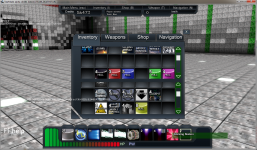
This block has its own inventory and it can be used to store items, if players don't have enough space for it in their own inventory. It can also be used to share items with other players. A simple drag and drop system makes managing the inventory pretty natural. Of course, the stash module is consistent, and even if you end the game and come back later, all your precious stuff is still there for you.
The Recycling Module
This module is the first "active" inventory module in the game. If a player places modules in it, the recycling module will automatically convert that object over time into a more valuable module, which can either be used, or sold in the shop. In the future, this module will be used to create unique items.
Improved Gravity Physics
In older versions, the gravity physics were a bit buggy. The camera orientation got messed up, if the ship was rotating, and the character could fall off a fast moving ship. I revisited the gravity physics integration and fixed all those bugs. The character will now be steady on any surface, no matter how fast it is moving or turning.
The AI Module
This module allows any ship to be controlled by an artificial intelligence. More than that, it allows the player to configure the behavior of the AI in great detail. It will be possible to create attacking ships, fixed turrets (which are docked to the players own ship or a space station), or friendly wing men. The module will also get a remote control module in the future, allowing the AI to be given commands from far away. There will also be more detailed options of behavior (depending on the type of AI), that allows for example to prioritize attacking certain types of blocks on an enemy ship.
Block Orientation
As promised, block orientation is now implemented. It will be possible to add weapons on the sides and back of your ship. Also, the gravity module will adjust the gravity given to the player by its orientation, so players can walk on walls or even on the ceiling of any structure.
Improved Gravity Physics
In older versions, the gravity physics were a bit buggy. The camera orientation got messed up, if the ship was rotating, and the character could fall off a fast moving ship. I revisited the gravity physics integration and fixed all those bugs. The character will now be steady on any surface, no matter how fast it is moving or turning.
Noteworthy Bug Fixes & Other Changes
As this article is getting quite long, I'll try to keep this list to the most important aspects only:
- tutorial will no longer skip steps if 'k' was pressed in the ship naming dialog
- closed memory leak, that would allocate segments, even when it's clear, that it's going to be empty
- fixed possible server crash when saving ship to server
- increased segment lighting calculation time and therefore graphical segment loading in general
- fixed character camera orientation in gravity
- fixed in-ship camera restriction (got sometimes stuck when inside a non-thruster-controlling module)
- Revisited the gravity code -> much more robust & no more falling off fast moving ships.
- Fixed bug that let ships shoot at target from way too far away.
- Selected entities will no more fade away if far away
- Docked objects can now used the energy of it's parent
Control Changes:
Keep in mind that some of the controls have changed. You can look up what every key does in the options menu and remap it if you like.
Placing orientated modules can be done by holding shift and pressing the direction key, the block should face. A little arrow will indicate, which direction it's currently facing.
Installation Notices:
If you already have a Version of StarMade installed, you can continue to play with your previous Universe by pressing the 'Migrate Database' button in the start up menu. If you have any old ships in your database or try to import ships from an earlier version, the data will be automatically migrated to the new format. Also, as backups are always created on a version update, you don't have to worry about losing data. If you have any problems with the install, please feel free contact me by PM, and I'll try my best to get it working for you.