Description
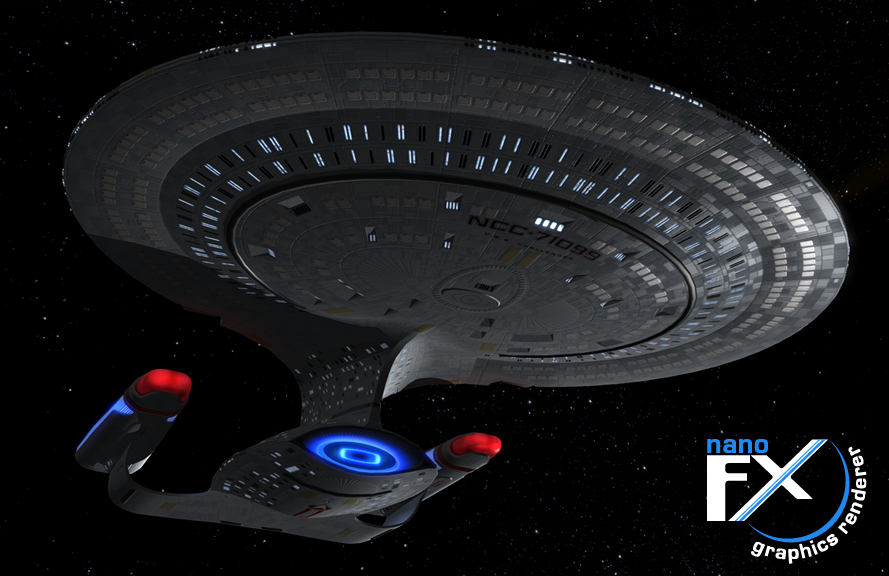
The NanoFX Model Viewer is a utility that allows you to view models with the same graphical effects that will appear in Star Trek Excalibur. This latest version adds doppler sound effects, navigational lights and warp travel. As always this software only accurately represents the graphics in Excalibur. Movement, weapons, ship models included, etc have only been added in to give more entertainment value.
Preview
Post a comment


Have a problem, will try to translate into english:
System.NullReferenceException : there is no references on object
nFx.mview.frmNFXGE.OnPaint(PaintEventArgs e)
P.S.: What language do you use? Because this exception reminds me about Delphi )
Sorry for ****** translation and my english)
try setting your computer language to English. Has a bit of a problem with "," and "." swapping round in the code. Update soon.
Got same problem. Switching win to english don't help.
Awesome!
Though i have a few questions:
How do i bring the weapons and shields online with a player controlled ship? And how do i enable red alert? Thanks
Hello,
i have just downloaded the latest version (1.7) of the NanoFX viewer. I also first read the documentation file. However, once i open the Program, i can only "spawn" a shuttle, some stations or the Galaxy class. I have seen videos with a lot more that just that. Secondly, there is no way for me to "go to warp" or "fire phasers" as was advertised. I also dont have any of the dropdown menus visible in the documentaion. Am i missing something? I met all of the requirements as stated in the documentation.
Shift+w - warp
Backspace - full stop
F - phasers
V - pulse phasers/disruptors
space - torps
shift+3 - red alert
Click the corresponding category (e.g., Federation->Ships) to bring up available models.
You only seem to get Federation ships in this version, but if you have already downloaded the earlier version of the viewer with more ships just copy those files to the relevant folder in the new viewer and you'll get all the ships that were available before working just fine.
Really good update. Nice to have weapons and be able to get in on the action rather than just watching it. Nice work. Looking really good.
where do i get all the ship classes you've shown? it only came packed with a Galaxy
Nanofx-evolved.com
fan-conversions of free models.
This comment is currently awaiting admin approval, join now to view.
Looks cool,downloading!
This really is exceptionally well done, thank you for sharing =]
I need your help. What do i do when it s download to my computer ? What do i need to press to get it working. An sorry four the bad english gramma :).
This comment is currently awaiting admin approval, join now to view.
I can say with no pleasure that this program is not working. Don't know what is the reason thou'. Perhapse that because it's Windows 8? But even with compatibility setup to WinXP it's still not running up. Dies before start (if I can name it that way)
Where do i get more ships for this i would like to get Voyagers model...?
is there anyway to look inside the ship now???
If this had great looking battle damage I can see myself enjoying this but so far this doesn't look much different than bridge commander.
This thing barely works and frankly looks no better than bc km...I mean neat thing to put in but if you cant even see damage effects it's pretty boring, and only a few ships to choose from but they control like crap.
You guys are losing the interest of pretty much everyone on this been quite a while since anyone has even bothered to post anything about this and only a few youtube vids.
I thought this was a game when I looked at it but it's just a concept nothing concrete.
I'm sure you guys have put some great effort into this but I dont see why anyone would need to donate something that is taking this long to achieve.
Seems clear too me this whole project is too good to be true...4 years since they released this thing with no new updates, ships, or anything...Yeah I think it's time I just move on this thing isn't going anywhere. Thanks for getting peoples hopes up for an amazing star trek game only to never be able to deliver due to your ambitions and goals not being realistic.
cheers.
This comment is currently awaiting admin approval, join now to view.