How does the computer convert source code to an interactive game? Let's find out!
Theory
Games consist of four main parts of code: load, update, draw and events.
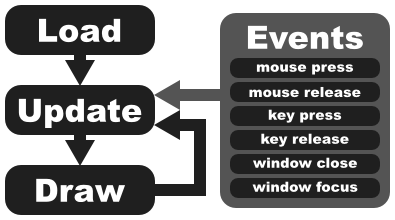
Diagram of how a game runs
load()
The load() function is used to open resources (images, sounds..) and give them names (variables).
update(dt)
update() runs after load() or draw() finishes. Calculations about game changes happen there - for example character movement.
dt measures the time it took to update() since the last time there was an update(). On an old computer, dt can be a big number (1 or even more) on a modern computer, it should be very small (at least 0.016 or less).
draw()
The draw() function is executed each time update() finishes. It is used for drawing shapes and images.
events
Events happen when keys or mouse buttons are pressed or released or when the current window loses focus or is being closed by the "X"/"Close" button.
Practice
Let's make the keyboard move an image around on the screen!
Prepare
- Download and install love2d (aka LÖVE)
- Create a new folder (directory) called "myGame"
- Download and move the file unit1.png into "myGame"
- Create a new text file (.txt, not a word document!) using TextEdit, Kate, GEdit or Notepad++ (Don't use Notepad!) called main.lua (not Main.lua or main.LUA or mAIn.lUa ;) ).
The file/folder structure should look like this:
 myGame/
|_  unit1.png
|_  main.lua
Program
Write the following into the myGame/main.lua file:
love.load()
We will create a list for the images, create a unit and 'configure' it and set the background color.
img = {
monster = love.graphics.newImage("unit1.png"),
}
units = {
{ -- this is automatically the first unit in "units" which can be accessed via "units[1]"
pos = { math.random(200,600) ,math.random(200,400) }, -- these are the (random at game start) x/y coordinates of the unit
speed = 100,
moveDir = { 0, 0 }, -- movement direction: {-1,-1} would be 100% left and 100% up, {0,1} would be 100% right. We will add ways to change moveDir later.
},
}
love.graphics.setBackgroundColor(244,200,200) -- no bg color, no fun!
end
love.update(dt)
On each update(), the unit's new position gets calculated.
The new position depends on dt, otherwise the movement would depend on the update() frequency (and thus on the computer speed).
units[1].pos = {units[1].pos[1] + (units[1].moveDir[1] * units[1].speed * dt), units[1].pos[2] + (units[1].moveDir[2] * units[1].speed * dt)}
end
love.draw()
All we do is draw the unit at its position. Background is re-drawn automatically in the beginning of draw().
love.graphics.draw(img.monster, units[1].pos[1], units[1].pos[2])
end
Events (love.keypressed() and love.keyreleased())
Axis movement directions are set to 1, 0 or -1, according to what arrow key is pressed.
if key == "up" then
units[1].moveDir[2] = -1
elseif key == "down" then
units[1].moveDir[2] = 1
elseif key == "right" then
units[1].moveDir[1] = 1
elseif key == "left" then
units[1].moveDir[1] = -1
end
end
function love.keyreleased(key, isrepeat)
if key == "up" then
units[1].moveDir[2] = 0
elseif key == "down" then
units[1].moveDir[2] = 0
elseif key == "right" then
units[1].moveDir[1] = 0
elseif key == "left" then
units[1].moveDir[1] = 0
end
end
Well that's it! You can just download the code above in this file: main.lua.
Running the game
You can either
- Drag-and-drop the folder "myGame" onto a LÖVE executable or link or
- Make a zip file that contains unit1.png and main.lua (it may not contain the directory "myGame" though) and then run it using love2d
This is what you should see:
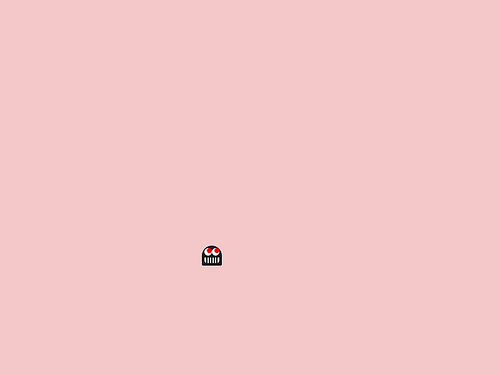
This is it! You understand how the load-update-draw-events system works and are prepared to make some simple games! See you in my next tutorial!



great tut, i will have a go at this when i am free after my exams
great tutorial :)
any chance of getting another that deals with basic multiobject collision code(outside of box2d).
I needed something like this, thanks. :)